The older I get, the more I value - in fact, treasure - clear and precise communication. Some (not all) jargon terms like "solution" and "space" are sure-fire indicators of vagueness in both speech and thinking (or even no
thinking at all).
"Solution" is a particularly egregious example; the speaker (particularly if a sales-type) should really say "product". This ignores the fact that a product is almost never a complete solution to a business problem and that changes to processes, policies and training will also be required. This is a recurring theme in the information security business, so we should all know it, though actually walking the talk turns out to be difficult in practice. Perhaps sticking a quote from Bruce Schneier on the wall will help: "Security is a process, not a product".
Of course, the sales-type is appealing to the prospect's desire for an easy fix to a problem, and so the choice of the word is semi-deliberate. And perhaps there once was something to the notion that vendors should attempt to fit their products to customer problems, but that is a custom more honoured in the breach; I don't recall ever hearing a salesperson say, "Actually, our product isn't an exact solution to your problem. Perhaps you should talk to [name of competitor]".
"The chief cause of problems is solutions"
--- Eric Sevareid, 1970
Very true, and some of my best consulting assignments have not been fixing up problems, they quite literally have been fixing up "solutions".
In the vast majority of cases, a product may be a component of a solution, or it may be a tool used in the creation of a solution. But it's not a solution in and of itself. In fact, the use of the term is symptomatic of pandering to over-inflated user expectations, and we all know what that leads to.
I strongly recommend that people who use the word "solution" try to get by without it for a while and see how much their critical thinking skills improve. It very often represents abstraction to the point of having lost all semantic content, and can easily be replaced by the word "product", "thing" or "sales opportunity". Or even "over-priced and bug-ridden pile of junk that is going to create even more work".
Jargon - whether technical or management-related - tends to aggregate, encapsulate and hide lots of assumptions for convenience. That's why it's used. And I know from experience that teasing out those hidden assumptions can be extremely rewarding, whether it's being done for risk analysis or product evaluation. Sometimes, it's true, we use jargon as a marker of group membership - to sound like a consultant or technical expert. Many of us are quite capable of playing that game in order to gain initial acceptance by clients & colleagues, but can take it one step further - when we steer the conversation into a deeper level in order to get beneath the veneer of jargon, and find that our interlocutor is still spouting buzzwords and acronyms, then we know to be on our guard. The probability of problems down the track due to hidden assumptions is quite high.
Words like "solution" do to your brain what fast food does to your body.
Just like that Big Mac, jargon phrases have had a lot of processing before they get to you, and contain lots of hidden connotations that aren't always good for you.
The problem is endemic, and has spread to small businesses, presumably because they want to sound like big businesses. My wife recently told me about a small store a couple of suburbs over from us that sells equipment for people who mess about on boats - what used to be called a "ship's chandler" - but now describe themselves as suppliers of "boating solutions". Barf. Pittwater, just north of Sydney, is something of a boating paradise and opportunity for lots of pleasure, not problems that require solutions.
The word "solution" should be taken round the back, late at night, and shot in the head, then rolled up in old carpet and dumped by a deserted highway where the hyenas can dispose of the remains. It is a lazy and unproductive little toe-rag that over-promises and under-delivers, contributes nothing to society and can usually be seen loitering around the scene while mortgage financiers, bank CEO's, consultants, salesmen and other ne'er-do-wells abscond with misappropriated cash from idiots who believe that they can buy stuff that will do their jobs for them.
Thursday, July 14, 2011


Thursday, May 5, 2011
The Infamous "Packet Scheduler Miniport" Problems
Like many people, I've had the problem with the "Packet Scheduler Miniport" appearing in the Device Manager with a yellow exclamation mark against it. Even worse, the Lenovo ThinkVantage Toolbox on my laptop picked up on this and put a similar exclamation mark on its icon in the taskbar - a constant reminder that all was not right with the system.
Googling for this turned up various suggestions - none of which worked, although it appears that a lot of people have had problems with this. But I eventually got it sorted out. Here's the deal:
This particular driver is used by the "QoS Packet Scheduler" in the TCP/IP stack, which reserves some bandwidth for any applications that require priority quality of service. The general fix is to open the properties for any network connection and then select this service and uninstall it. This should remove the driver, although it might be necessary to "Scan for hardware changes" in the Device Manager to get the display to update.
Problem is, that wouldn't work for me. However, opening up the properties for this driver revealed a curious fact: the version number shown for the driver was 5.1.2535.0 (same as for many other Microsoft-supplied basic drivers like CD-ROM, etc.) while the version shown for the psched.sys driver file was 5.1.2600.5512.
So, off to regedit to search through the registry for the string "2535". It appears many times, mostly on other drivers, but wherever it appeared as a DriverVersion string for PSCHED entries, I changed it to the file version number of 5.1.2600.5512. Just to be prudent, I then rebooted - I'd wasted so much time on this problem already that a reboot was a small price to pay, then went in to my network connections and uninstalled the "QoS Packet Scheduler", and immediately, in the background, the yellow-asterisked Miniport entry disappeared from the Device Manager.
Reinstalling the "QoS Packet Scheduler" service hasn't caused any problems, either - the Miniport doesn't appear in the regular Device Manager display, but shows up with the other miniports when "View -> Show hidden devices" is selected. This is because those miniports don't normally appear unless they are malfunctioning.
So now you know - the problem is entirely down to the driver version number in the registry not matching the version number in the driver file. Make them agree, and all will be well with the world. I suspect the problem is that XP SP3 updated the driver file, but did not correctly update the registry DriverVersion entries.
I hope this helps others who have had this error niggling at them.
Googling for this turned up various suggestions - none of which worked, although it appears that a lot of people have had problems with this. But I eventually got it sorted out. Here's the deal:
This particular driver is used by the "QoS Packet Scheduler" in the TCP/IP stack, which reserves some bandwidth for any applications that require priority quality of service. The general fix is to open the properties for any network connection and then select this service and uninstall it. This should remove the driver, although it might be necessary to "Scan for hardware changes" in the Device Manager to get the display to update.
Problem is, that wouldn't work for me. However, opening up the properties for this driver revealed a curious fact: the version number shown for the driver was 5.1.2535.0 (same as for many other Microsoft-supplied basic drivers like CD-ROM, etc.) while the version shown for the psched.sys driver file was 5.1.2600.5512.
So, off to regedit to search through the registry for the string "2535". It appears many times, mostly on other drivers, but wherever it appeared as a DriverVersion string for PSCHED entries, I changed it to the file version number of 5.1.2600.5512. Just to be prudent, I then rebooted - I'd wasted so much time on this problem already that a reboot was a small price to pay, then went in to my network connections and uninstalled the "QoS Packet Scheduler", and immediately, in the background, the yellow-asterisked Miniport entry disappeared from the Device Manager.
Reinstalling the "QoS Packet Scheduler" service hasn't caused any problems, either - the Miniport doesn't appear in the regular Device Manager display, but shows up with the other miniports when "View -> Show hidden devices" is selected. This is because those miniports don't normally appear unless they are malfunctioning.
So now you know - the problem is entirely down to the driver version number in the registry not matching the version number in the driver file. Make them agree, and all will be well with the world. I suspect the problem is that XP SP3 updated the driver file, but did not correctly update the registry DriverVersion entries.
I hope this helps others who have had this error niggling at them.
Wednesday, February 23, 2011
Wi-Fi and the Kindle
A lot of people are running into trouble getting their Kindle to connect to wi-fi networks - generally problems with "passwords". In many cases, it's confusion over exactly what password is required. Let's look at typical home wireless networks first:
Home Wireless Networks
Most people set up their home network using one of two different types of device;. They might have a wi-fi access point like the NetGear WG602, particularly if they already have some other devices to provide their Internet connection. Or they might have a wireless router, like the NetGear DG834G, which combines the wireless access point with a router (and perhaps also an ADSL or cable modem), all in the one box. Now, to the "passwords":
A home network wi-fi access point has two (2) different "passwords"; a wireless router has three (3). These are:
1) the administration password
2) the wireless network encryption key
3) the login name and password to authenticate to your ISP
Taking each of these in turn:
1) Admin password. This lets you log in to the access point or router through a browser interface and administer it (change settings, etc.) When you log in to the device, you will see something like the screenshot below. Your Kindle and other network devices do not need to know this password.
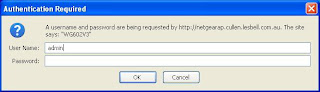
Fig 1. The login prompt for a NetGear WG602 wireless access point
2) Wireless encryption key. This is used to encrypt the wireless traffic so that bad guys can't sniff it and see what you're doing, or join your network and use your Internet connection to download pr0n, leaving you with explaining to do when the Feds come knocking. The key is really a long binary number, but because humans aren't very good at choosing - let alone remembering - long binary numbers, wireless devices also have an option that will turn a passphrase (not necessarily word) into the key. All devices that connect to the wireless network have to use the same key or passphrase, including any Kindles.
This passphrase is set when you configure the wireless side of your router, as shown here. Other things you should note are your network name or SSID, and the type of encryption in use - I recommend WPA2 with Pre-Shared Key (WPA2-PSK) as WEP and WPA are easily crackable.
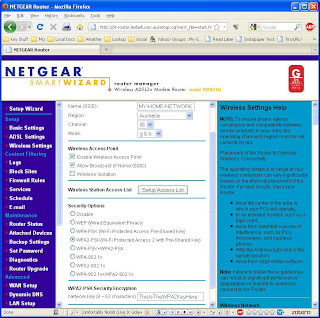
Fig 2. Wireless settings on a NetGear DG834G wireless ADSL router.
For WPA2, the key is 256 bits long, and some routers will let you directly enter it as a string of 64 hexadecimal digits (that is, the digits 0-9 and a-f [upper or lower case]). However, you can enter a passphrase of up to 63 characters, and the router's logic will combine that with your network name (technically known as the SSID) in order to generate the 256-bit key. Because the SSID is also used in this process, it's a good idea to choose an unusual SSID (not the default, for sure) and then a passphrase of as few as 16 characters will keep you adequately secure.
Keeping the passphrase short is a good idea when you have to enter it into devices like the Kindle, where the keyboard isn't the greatest or there's no keyboard at all. Entering the 64-hex-digit key directly probably isn't a great idea, because not all devices can support that - it's best to stick with the passphrase technique.
But remember: it's still generating an encryption key, and it's best to keep calling it that to distinguish it from the other passwords involved.
[For the technically-minded, the way the router generates the key is using an algorithm called PBKDF2 (Password Based Key Derivation Function 2), which applies the keyed HMAC-SHA1 function 4096 times over, using the SSID as salt, which makes rainbow tables attacks infeasible].
If you didn't set up your encryption key (good grief, why not? It's your network!) then you might find the default value on a label attached to the bottom of the device. But it's good practice to come up with your own passphrase/key.
3) Routers also have a username and password which authenticates the router to your Internet service provider via your cable or ADSL connection. No other devices need to know this information.
So there you have it. Make sure all these bits of information are written down somewhere and stuck in the book where you record all your important computer information. And, notice, the Kindle only needs item 2), the WEP/WPA/WPA2 encryption key, which you will usually enter in the form of a passphrase (though I still insist on calling it a key. Because that's what it is).
To set up the Kindle, press "Home", "Menu" and then select "Settings". The Kindle may ask if it's OK to turn wireless on - click "OK". A list of visible wi-fi networks will appear, and you should see your own, with the SSID that you set up on your access point or router. Select it and you will be prompted to enter the WPA2 passphrase discussed above. Your Kindle should now connect.
Your network might not appear because it is set to not broadcast its SSID (a weak security measure). If that's the case, then use "enter other Wi-Fi network" to enter its SSID and password. Generally, the Kindle will detect the type of encryption being used, but you can also click on the "advanced" button and set that manually.
Public Networks
Many coffee shops, libraries and other public spaces now offer free wi-fi to customers. Generally, the Kindle will connect automatically - just use "Home", "Menu", Settings", "Wi-Fi Settings" and look for the network by name.
Sometimes such networks require you to indicate acceptance of their terms and conditions, and they do this by getting you to click on a button on a web page. Until you do this, the wi-fi connection will not work. In some cases, the Kindle detects this and will pop up a little message that asks you if you want to use the browser to connect to the network - you should do this and read the resulting page, then navigate to and click on the button.
Company networks, university wi-fi networks and others may also require you to have an account and log in, via user name, student ID and password. Again, the Kindle usually detects this and will offer to start the browser. It attempts to load the Amazon home page, but this will be redirected to the enterprise network authentication page, and you will need to navigate to the right fields and enter your credentials in order to log in. Once this has been done, the browser then usually proceeds to load the Amazon page; at this point, you can either continue web surfing or press "Home" and proceed to sync, download books or whatever you need to do.
The important point is that for some, semi-private, networks you cannot sync and cannot download books, periodicals, etc. until you have authenticated through the browser. So if the Kindle is not downloading properly, it's generally a good idea to see what the browser is showing.
Other Problems
Generally, attention to the above points - especially correct setup of a WPA2 key - will get your Kindle connected. However, occasionally it may fail to connect. Here's some general advice:
Disable MAC filtering. It does no good at all from a security perspective, since an attacker can observe which MAC (Media Access Control) addresses are in use on your network and set his device to use one of them, thereby bypassing that particular defense. Really, it does no good and just makes work for you, the network owner.
If you have an older N-type router or access point, make sure that you upgrade to the latest firmware for it. Many manufacturers announced and shipped "N" devices before the IEEE 802.11n standard was ratified, with the intention of fixing any incompatibilities later, with firmware upgrades. Also make sure that it supports both 20 and 40 MHz channel widths - 802.11b/g devices use 20 MHz only, so if the router is set to 40 MHz only, it will not be compatible. So make sure that you've upgraded the firmware. In some cases, I'd guess that a firmware upgrade alone won't do the trick, and the answer might be to disable "N' mode (configure the router to use only 802.11-g and/or 802.11b), or to buy a new router or access point. It might also be worth disabling "N" mode as a test.
Update (13/1/2012): It seems that the Kindle 4 and Kindle Touch use an Atheros AR6103 wi-fi chip. Looking at the "Product Bulletin" for that chip, it appears to implement only a small subset of the IEEE 802.11n standard. There are several new technologies that make 802.11n so much more effective: operation on both 2.4 GHz and 5 GHz bands simultaneously, use of multiple streams simultaneously over multiple MIMO (Multiple Input / Multiple Output) antennas, and the use of 40 MHz channel widths. However the AR6103 only utilises a single stream, and appears to utilise 64 QAM encoding over a single 20 MHz channel only. As a result, it achieves a maximum data rate of 72.2 Mbps only, which is not much improvement over 802.11g's 56 Mbps.
Worse still, it looks like this partial implementation of the 802.11n standard is what is "confusing" many routers and access points, so that the Kindles cannot associate with them. As described above, firmware upgrades, at least enabling b/g compatibility or even disabling "n" operation might be required, as might disabling 40 MHz-only channel widths.
As to what's in the Kindle Fire, I'm still in the dark. It seems to be a Texas Instruments WiLink 6.0 chip, but whether it's a WL1271 (b/g/n only) or the less likely WL1273 (a/b/g/n) is still unknown.
Hopefully, this will help folks get their Kindles connected.
Home Wireless Networks
Most people set up their home network using one of two different types of device;. They might have a wi-fi access point like the NetGear WG602, particularly if they already have some other devices to provide their Internet connection. Or they might have a wireless router, like the NetGear DG834G, which combines the wireless access point with a router (and perhaps also an ADSL or cable modem), all in the one box. Now, to the "passwords":
A home network wi-fi access point has two (2) different "passwords"; a wireless router has three (3). These are:
1) the administration password
2) the wireless network encryption key
3) the login name and password to authenticate to your ISP
Taking each of these in turn:
1) Admin password. This lets you log in to the access point or router through a browser interface and administer it (change settings, etc.) When you log in to the device, you will see something like the screenshot below. Your Kindle and other network devices do not need to know this password.

Fig 1. The login prompt for a NetGear WG602 wireless access point
2) Wireless encryption key. This is used to encrypt the wireless traffic so that bad guys can't sniff it and see what you're doing, or join your network and use your Internet connection to download pr0n, leaving you with explaining to do when the Feds come knocking. The key is really a long binary number, but because humans aren't very good at choosing - let alone remembering - long binary numbers, wireless devices also have an option that will turn a passphrase (not necessarily word) into the key. All devices that connect to the wireless network have to use the same key or passphrase, including any Kindles.
This passphrase is set when you configure the wireless side of your router, as shown here. Other things you should note are your network name or SSID, and the type of encryption in use - I recommend WPA2 with Pre-Shared Key (WPA2-PSK) as WEP and WPA are easily crackable.

Fig 2. Wireless settings on a NetGear DG834G wireless ADSL router.
For WPA2, the key is 256 bits long, and some routers will let you directly enter it as a string of 64 hexadecimal digits (that is, the digits 0-9 and a-f [upper or lower case]). However, you can enter a passphrase of up to 63 characters, and the router's logic will combine that with your network name (technically known as the SSID) in order to generate the 256-bit key. Because the SSID is also used in this process, it's a good idea to choose an unusual SSID (not the default, for sure) and then a passphrase of as few as 16 characters will keep you adequately secure.
Keeping the passphrase short is a good idea when you have to enter it into devices like the Kindle, where the keyboard isn't the greatest or there's no keyboard at all. Entering the 64-hex-digit key directly probably isn't a great idea, because not all devices can support that - it's best to stick with the passphrase technique.
But remember: it's still generating an encryption key, and it's best to keep calling it that to distinguish it from the other passwords involved.
[For the technically-minded, the way the router generates the key is using an algorithm called PBKDF2 (Password Based Key Derivation Function 2), which applies the keyed HMAC-SHA1 function 4096 times over, using the SSID as salt, which makes rainbow tables attacks infeasible].
If you didn't set up your encryption key (good grief, why not? It's your network!) then you might find the default value on a label attached to the bottom of the device. But it's good practice to come up with your own passphrase/key.
3) Routers also have a username and password which authenticates the router to your Internet service provider via your cable or ADSL connection. No other devices need to know this information.
So there you have it. Make sure all these bits of information are written down somewhere and stuck in the book where you record all your important computer information. And, notice, the Kindle only needs item 2), the WEP/WPA/WPA2 encryption key, which you will usually enter in the form of a passphrase (though I still insist on calling it a key. Because that's what it is).
To set up the Kindle, press "Home", "Menu" and then select "Settings". The Kindle may ask if it's OK to turn wireless on - click "OK". A list of visible wi-fi networks will appear, and you should see your own, with the SSID that you set up on your access point or router. Select it and you will be prompted to enter the WPA2 passphrase discussed above. Your Kindle should now connect.
Your network might not appear because it is set to not broadcast its SSID (a weak security measure). If that's the case, then use "enter other Wi-Fi network" to enter its SSID and password. Generally, the Kindle will detect the type of encryption being used, but you can also click on the "advanced" button and set that manually.
Public Networks
Many coffee shops, libraries and other public spaces now offer free wi-fi to customers. Generally, the Kindle will connect automatically - just use "Home", "Menu", Settings", "Wi-Fi Settings" and look for the network by name.
Sometimes such networks require you to indicate acceptance of their terms and conditions, and they do this by getting you to click on a button on a web page. Until you do this, the wi-fi connection will not work. In some cases, the Kindle detects this and will pop up a little message that asks you if you want to use the browser to connect to the network - you should do this and read the resulting page, then navigate to and click on the button.
Company networks, university wi-fi networks and others may also require you to have an account and log in, via user name, student ID and password. Again, the Kindle usually detects this and will offer to start the browser. It attempts to load the Amazon home page, but this will be redirected to the enterprise network authentication page, and you will need to navigate to the right fields and enter your credentials in order to log in. Once this has been done, the browser then usually proceeds to load the Amazon page; at this point, you can either continue web surfing or press "Home" and proceed to sync, download books or whatever you need to do.
The important point is that for some, semi-private, networks you cannot sync and cannot download books, periodicals, etc. until you have authenticated through the browser. So if the Kindle is not downloading properly, it's generally a good idea to see what the browser is showing.
Other Problems
Generally, attention to the above points - especially correct setup of a WPA2 key - will get your Kindle connected. However, occasionally it may fail to connect. Here's some general advice:
Disable MAC filtering. It does no good at all from a security perspective, since an attacker can observe which MAC (Media Access Control) addresses are in use on your network and set his device to use one of them, thereby bypassing that particular defense. Really, it does no good and just makes work for you, the network owner.
If you have an older N-type router or access point, make sure that you upgrade to the latest firmware for it. Many manufacturers announced and shipped "N" devices before the IEEE 802.11n standard was ratified, with the intention of fixing any incompatibilities later, with firmware upgrades. Also make sure that it supports both 20 and 40 MHz channel widths - 802.11b/g devices use 20 MHz only, so if the router is set to 40 MHz only, it will not be compatible. So make sure that you've upgraded the firmware. In some cases, I'd guess that a firmware upgrade alone won't do the trick, and the answer might be to disable "N' mode (configure the router to use only 802.11-g and/or 802.11b), or to buy a new router or access point. It might also be worth disabling "N" mode as a test.
Update (13/1/2012): It seems that the Kindle 4 and Kindle Touch use an Atheros AR6103 wi-fi chip. Looking at the "Product Bulletin" for that chip, it appears to implement only a small subset of the IEEE 802.11n standard. There are several new technologies that make 802.11n so much more effective: operation on both 2.4 GHz and 5 GHz bands simultaneously, use of multiple streams simultaneously over multiple MIMO (Multiple Input / Multiple Output) antennas, and the use of 40 MHz channel widths. However the AR6103 only utilises a single stream, and appears to utilise 64 QAM encoding over a single 20 MHz channel only. As a result, it achieves a maximum data rate of 72.2 Mbps only, which is not much improvement over 802.11g's 56 Mbps.
Worse still, it looks like this partial implementation of the 802.11n standard is what is "confusing" many routers and access points, so that the Kindles cannot associate with them. As described above, firmware upgrades, at least enabling b/g compatibility or even disabling "n" operation might be required, as might disabling 40 MHz-only channel widths.
As to what's in the Kindle Fire, I'm still in the dark. It seems to be a Texas Instruments WiLink 6.0 chip, but whether it's a WL1271 (b/g/n only) or the less likely WL1273 (a/b/g/n) is still unknown.
Hopefully, this will help folks get their Kindles connected.
Friday, February 4, 2011
Under the Cover of the Amazon Kindle Collections Feature
The Kindle is a lovely reading device - light, highly legible, convenient. One of its features is its ability to organise books into multiple collections, including the ability to have books in more than one collection. Although the Kindle runs Linux, it can't be using subdirectories and (sym)links for this purpose, so how does it work?
Very simply, actually. The collection data is stored in a text file, in JSON format. It's easy to view, too - here's how (instructions for Windows, but easily adapted for users of other platforms):
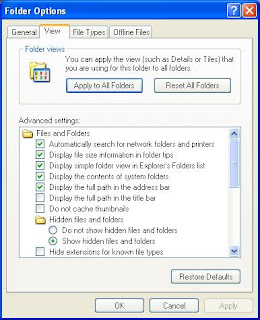
Plug your Kindle into your PC via its USB cable. Use "My Computer" to navigate to it - it mounts as F: on my desktop box. The collections are stored in the "system" folder, which is normally hidden - to view it, in Windows Explorer choose "Tools" -> "Folder Options...", then select the "View" tab. In the "Advanced Settings" box, select"Hidden files and folders" / "Show hidden files and folders"as shown below:
Click on OK to close the dialog. You should now see the various folders on the Kindle: "audible", "documents", etc. and "system", slightly fainter to indicate it's normally hidden. Open "system" and you'll see various files one shouldn't normally tinker with, including "collections.json". You can open this file with WordPad to see its contents - be warned, it's pretty ugly, but we can do something about that, as you'll see - by right-clicking, choosing "Open" and selecting "Select the program from a list" and then "WordPad" from the resulting dialog (probably best to uncheck "Always use the selected program to open this kind of file" at this stage.
To make sense of what you see, use an online JSON viewer: http://jsonviewer.stack.hu/ You can select all the text in the WordPad window (Ctrl+A), then copy (Ctrl+C) and paste (Ctrl+V) the text into the JSON viewer's text area. It still looks pretty ugly, but click on the "Format" button at the top and it looks a lot better:

Click on the "Viewer" tab and you'll see a much better representation of your collections. As you can see, each collection has a locale string appended to it, and then there's an array of items, each of which is typically the ASIN number of the book. This is correlated with the ASIN strings in the filenames of the book files themselves, in the "documents" folder.

This structure only allows for one level of collections - no nested subcollections. However, JSON - which stands for JavaScript Object Notations is a very simple format to handle in many programming languages, making it easy to write programs which could read the "collections.json" file, allow you to rearrange it in various ways and then rewrite it. There's not much more one can do with this, unfortunately - the Kindle software would get very upset if you tried to change the JSON structure. But it's not terribly complex, and in the future, Amazon probably could extend it without too much trouble. And the fact they are using an open standard like JSON means that any utilities could be adapted to any future formats without too much trouble.
For more details on JSON, see http://www.json.org/.
Very simply, actually. The collection data is stored in a text file, in JSON format. It's easy to view, too - here's how (instructions for Windows, but easily adapted for users of other platforms):
Plug your Kindle into your PC via its USB cable. Use "My Computer" to navigate to it - it mounts as F: on my desktop box. The collections are stored in the "system" folder, which is normally hidden - to view it, in Windows Explorer choose "Tools" -> "Folder Options...", then select the "View" tab. In the "Advanced Settings" box, select"Hidden files and folders" / "Show hidden files and folders"as shown below:

Click on OK to close the dialog. You should now see the various folders on the Kindle: "audible", "documents", etc. and "system", slightly fainter to indicate it's normally hidden. Open "system" and you'll see various files one shouldn't normally tinker with, including "collections.json". You can open this file with WordPad to see its contents - be warned, it's pretty ugly, but we can do something about that, as you'll see - by right-clicking, choosing "Open" and selecting "Select the program from a list" and then "WordPad" from the resulting dialog (probably best to uncheck "Always use the selected program to open this kind of file" at this stage.
To make sense of what you see, use an online JSON viewer: http://jsonviewer.stack.hu/ You can select all the text in the WordPad window (Ctrl+A), then copy (Ctrl+C) and paste (Ctrl+V) the text into the JSON viewer's text area. It still looks pretty ugly, but click on the "Format" button at the top and it looks a lot better:

Click on the "Viewer" tab and you'll see a much better representation of your collections. As you can see, each collection has a locale string appended to it, and then there's an array of items, each of which is typically the ASIN number of the book. This is correlated with the ASIN strings in the filenames of the book files themselves, in the "documents" folder.

This structure only allows for one level of collections - no nested subcollections. However, JSON - which stands for JavaScript Object Notations is a very simple format to handle in many programming languages, making it easy to write programs which could read the "collections.json" file, allow you to rearrange it in various ways and then rewrite it. There's not much more one can do with this, unfortunately - the Kindle software would get very upset if you tried to change the JSON structure. But it's not terribly complex, and in the future, Amazon probably could extend it without too much trouble. And the fact they are using an open standard like JSON means that any utilities could be adapted to any future formats without too much trouble.
For more details on JSON, see http://www.json.org/.
Saturday, January 16, 2010
Fun with lastb
So, I have a few servers on the Internet, and a couple of them have a /var/log/btmp file (the others don't, so they haven't been collecting this stuff). The btmp file collects bad login info, which can be displayed with the lastb command. Although I rate-limit SSH connections to those machines to 3 per minute before blocking the connecting IP address, they still some of the usual SSH bf bot login attempts, so the file has grown over the last year or so. I wondered what names the Bad Guys thought might get them in. A quick bit of pipelinery (lastb | cut -f1 -d' '|sort|uniq -c|sort -nr|less) later, here's the top 20 or so names on the machines:
Machine 1 (mail gateway and squid proxy):
968 admin
892 sales
863 test
781 staff
596 guest
197 fluffy
194 oracle
188 user
162 info
154 www
137 data
136 web
129 http
128 support
128 jeff
127 mike
126 john
126 install
126 cvs
124 tim
123 steve
117 demo
91 eaguilar
Machine 2 (mail gateway and web server):
355 admin
258 staff
118 sales
103 test
83 guest
54 eaguilar
53 user
47 globus
39 cisco
33 t1na
28 oracle
24 PlcmSpIp
24 lesbell
23 webmaste
23 a
22 alexis
16 mlmb
14 nagios
14 adam
13 lpd
12 raimundo
11 supporte
11 administ
OK, so it's obviously a bad idea to create accounts like admin, staff, test and sales, especially with weak passwords. And there must be a lot of Jeffs, Mikes, Johns and Tims out there.
But "fluffy"? I mean, really, who ever has a Unix account called "fluffy"? And who is this "eaguilar", who rates so highly? Not to mention "PlcmSplp" (and the lower-case variant, "plcmspip"); I guess it must have worked somewhere, once, or it wouldn't be on their list.
Looking at the log generally, it's interesting to see account names like "218-214-" (obviously derived from a reverse DNS lookup on the machine's IP address), not to mention snippets of HTML.
Machine 1 (mail gateway and squid proxy):
968 admin
892 sales
863 test
781 staff
596 guest
197 fluffy
194 oracle
188 user
162 info
154 www
137 data
136 web
129 http
128 support
128 jeff
127 mike
126 john
126 install
126 cvs
124 tim
123 steve
117 demo
91 eaguilar
Machine 2 (mail gateway and web server):
355 admin
258 staff
118 sales
103 test
83 guest
54 eaguilar
53 user
47 globus
39 cisco
33 t1na
28 oracle
24 PlcmSpIp
24 lesbell
23 webmaste
23 a
22 alexis
16 mlmb
14 nagios
14 adam
13 lpd
12 raimundo
11 supporte
11 administ
OK, so it's obviously a bad idea to create accounts like admin, staff, test and sales, especially with weak passwords. And there must be a lot of Jeffs, Mikes, Johns and Tims out there.
But "fluffy"? I mean, really, who ever has a Unix account called "fluffy"? And who is this "eaguilar", who rates so highly? Not to mention "PlcmSplp" (and the lower-case variant, "plcmspip"); I guess it must have worked somewhere, once, or it wouldn't be on their list.
Looking at the log generally, it's interesting to see account names like "218-214-" (obviously derived from a reverse DNS lookup on the machine's IP address), not to mention snippets of HTML.
Thursday, November 5, 2009
Can Windows Be Any More Intuitive?
Now here's a prime example of how intuitive Windows is: in an Explorer window, I selected some MPEG files - videos I'd recorded and watched - and pressed the Delete key. To free up some space, you know? And a few seconds later, I was confronted by this:
 Right. . . You can't delete a file because there isn't enough disk space. And your suggested fix for this is to delete a file?
OK, I totally get that when you delete a file, Windows doesn't delete it because you are too stupid to know whether you really wanted to delete it or not and will probably cry when you later discover that delete actually means delete. But, for the love of all that is logical, why does Windows go through the motions of actually copying the file, rather than just relinking it into a hidden directory somewhere for the "Recycle Bin" (just a fancy way of saying "Trash Can", anyway)? This would not require any additional space anywhere and files could be deleted in a fraction of a second instead of the minutes it sometimes takes. And it certainly wouldn't give rise to incredibly stupid and counterintuitive error messages like this one.
Thank $DEITY for the command line, where you can get the computer to do what you want, rather than what some UI genius thinks an idiot user ought to get.
 Right. . . You can't delete a file because there isn't enough disk space. And your suggested fix for this is to delete a file?
OK, I totally get that when you delete a file, Windows doesn't delete it because you are too stupid to know whether you really wanted to delete it or not and will probably cry when you later discover that delete actually means delete. But, for the love of all that is logical, why does Windows go through the motions of actually copying the file, rather than just relinking it into a hidden directory somewhere for the "Recycle Bin" (just a fancy way of saying "Trash Can", anyway)? This would not require any additional space anywhere and files could be deleted in a fraction of a second instead of the minutes it sometimes takes. And it certainly wouldn't give rise to incredibly stupid and counterintuitive error messages like this one.
Thank $DEITY for the command line, where you can get the computer to do what you want, rather than what some UI genius thinks an idiot user ought to get.
Monday, September 7, 2009
Privacy Isn't Just Confidentiality
I've been following some discussion, in a private security-related mailing list, on the topic of what constitutes sensitive information. What's interesting is that many participants seem to have completely missed the point about privacy, as opposed to security.
The whole thing started with a query as to whether a person's date of birth could be considered sensitive or confidential if combined with other personally identifiable information. The thread then meandered around various topics inclduing privacy, identity theft and authentication. It pretty much ended with various contributors suggesting that any security professional worth his (or her) salt should not need to ask this question, and in particular, the last person to ask it of should be a lawyer. One contributor - who had better remain nameless - stated outright, "No slight intended on lawyers, but if anybody who considers themselves to be an information security professional needs to rely on lawyers to tell them what sensitive information is and how they are to protect it then we are all doomed!".
Bzzt! Thank you for playing, Anonymous! Please bring on the next contestant.
Infosec professionals need to be aware of the law in this area, as in many others. And, the law being what it is, the best approach is to consult a lawyer. Certainly, one should have some degree of familiarity with the relevant local law; for me, here in Australia, this is the Privacy Act (C'wealth) (1988) [1] which defines personal information that is subject to the Act, as well as "sensitive information" which is subject to additional safeguards.
The Act defines personal information as "information or an opinion (including information or an opinion forming part of a database), whether true or not, and whether recorded in a material form or not, about an individual whose identity is apparent, or can reasonably be ascertained, from the information or opinion."
It further defines "sensitive information", which requires specific treatment under the Act as:
"(a) information or an opinion about an individual's:
(i) racial or ethnic origin; or
(ii) political opinions; or
(iii) membership of a political association; or
(iv) religious beliefs or affiliations; or
(v) philosophical beliefs; or
(vi) membership of a professional or trade association; or
(vii) membership of a trade union; or
(viii) sexual preferences or practices; or
(ix) criminal record;
that is also personal information; or
(b) health information about an individual; or
(c) genetic information about an individual that is not otherwise health information. "
If you're like me when I first read that list, you are probably surprised at some of the items on it, but upon mature reflection you'll probably come to agree and perhaps think of additional elements that should be added. All of which suggests that our intuitive understanding of privacy is often incomplete.
Notions of privacy vary enormously around the world; furthermore there is often a considerable gap between what an enterprise thinks it ought to know about its customers/clients/employees and what those individuals would like the enterprise to know and do with what it knows.
The essential difference between security/confidentiality and privacy is who has control; for security in general, the owner of the information has control, but for privacy, the subject of the information has control. As an individual, the subject clearly has little influence and especially not authority over what an enterprise information owner does; hence the mechanism by which subjects collectively exert that control is legislation.
Security professionals tend to focus on how to assure the confidentiality, integrity and availability of the information in the systems in their care. We put a lot of effort into making sure the bad guys can't get access to our information. But privacy legislation is written to make sure that we aren't the bad guys - that we don't collect information we shouldn't, and that we don't use information in ways we shouldn't. Sometimes that poses ethical conflicts, when our employers think it would be a good idea to collect or aggregate personal information contrary to legislation; in that case, we have to advise against this and require compliance with the law.
For the individual, the decision to disclose personal information is a trust decision. In some cases - when dealing with other individuals, for example - we are able to rely on their benevolence. But massive corporations, by and large, are not benevolent and not possessed of individual free will. We have to rely much more on their competence, their integrity in the sense of willingness to be bound to privacy compliance, and their ability to resist security breaches. Individuals are therefore forced to rely on what is sometimes called deterence-based trust - the existence of legal sanctions which ensure that penalties for breach of trust will exceed any potential benefits from opportunistic behaviour.
An excellent example from Icelandic usage of population genomics databases [2] illustrates the deeper complexities; most individuals have given virtually no thought to the privacy implications of releasing their DNA for research purposes, but fortunately medical and legal ethicists have been thinking about it and proposing additional safeguards. (Thanks to Graciela Pataro for this example).
So to say that security professionals don't need to consult a lawyer is disingenuous. Winging it and assuming that defending our systems against external threats simply isn't enough.
References:
[1] Privacy Act, 1988, as amended, Commonwealth Government of Australia. Available online at http://www.comlaw.gov.au/comlaw/management.nsf/lookupindexpagesbyid/IP200401860
[2] Herman T. Tavani, "The Case of DeCODE Genetics, Inc" in Chapter 1, "Ethics at the Intersection of Computing and Genomics" in Herman T. Tavani (ed.), "Ethics, Computing and Genomics", Jones & Bartlett Publishers, 2005. ISBN 0763736201, 9780763736200. Available online at http://books.google.com.au/books?id=wlrPaPRshesC&pg=PA15&dq=the+case+of+DECODE+Genetics+Inc#v=onepage&q=the%20case%20of%20DECODE%20Genetics%20Inc&f=false
The whole thing started with a query as to whether a person's date of birth could be considered sensitive or confidential if combined with other personally identifiable information. The thread then meandered around various topics inclduing privacy, identity theft and authentication. It pretty much ended with various contributors suggesting that any security professional worth his (or her) salt should not need to ask this question, and in particular, the last person to ask it of should be a lawyer. One contributor - who had better remain nameless - stated outright, "No slight intended on lawyers, but if anybody who considers themselves to be an information security professional needs to rely on lawyers to tell them what sensitive information is and how they are to protect it then we are all doomed!".
Bzzt! Thank you for playing, Anonymous! Please bring on the next contestant.
Infosec professionals need to be aware of the law in this area, as in many others. And, the law being what it is, the best approach is to consult a lawyer. Certainly, one should have some degree of familiarity with the relevant local law; for me, here in Australia, this is the Privacy Act (C'wealth) (1988) [1] which defines personal information that is subject to the Act, as well as "sensitive information" which is subject to additional safeguards.
The Act defines personal information as "information or an opinion (including information or an opinion forming part of a database), whether true or not, and whether recorded in a material form or not, about an individual whose identity is apparent, or can reasonably be ascertained, from the information or opinion."
It further defines "sensitive information", which requires specific treatment under the Act as:
"(a) information or an opinion about an individual's:
(i) racial or ethnic origin; or
(ii) political opinions; or
(iii) membership of a political association; or
(iv) religious beliefs or affiliations; or
(v) philosophical beliefs; or
(vi) membership of a professional or trade association; or
(vii) membership of a trade union; or
(viii) sexual preferences or practices; or
(ix) criminal record;
that is also personal information; or
(b) health information about an individual; or
(c) genetic information about an individual that is not otherwise health information. "
If you're like me when I first read that list, you are probably surprised at some of the items on it, but upon mature reflection you'll probably come to agree and perhaps think of additional elements that should be added. All of which suggests that our intuitive understanding of privacy is often incomplete.
Notions of privacy vary enormously around the world; furthermore there is often a considerable gap between what an enterprise thinks it ought to know about its customers/clients/employees and what those individuals would like the enterprise to know and do with what it knows.
The essential difference between security/confidentiality and privacy is who has control; for security in general, the owner of the information has control, but for privacy, the subject of the information has control. As an individual, the subject clearly has little influence and especially not authority over what an enterprise information owner does; hence the mechanism by which subjects collectively exert that control is legislation.
Security professionals tend to focus on how to assure the confidentiality, integrity and availability of the information in the systems in their care. We put a lot of effort into making sure the bad guys can't get access to our information. But privacy legislation is written to make sure that we aren't the bad guys - that we don't collect information we shouldn't, and that we don't use information in ways we shouldn't. Sometimes that poses ethical conflicts, when our employers think it would be a good idea to collect or aggregate personal information contrary to legislation; in that case, we have to advise against this and require compliance with the law.
For the individual, the decision to disclose personal information is a trust decision. In some cases - when dealing with other individuals, for example - we are able to rely on their benevolence. But massive corporations, by and large, are not benevolent and not possessed of individual free will. We have to rely much more on their competence, their integrity in the sense of willingness to be bound to privacy compliance, and their ability to resist security breaches. Individuals are therefore forced to rely on what is sometimes called deterence-based trust - the existence of legal sanctions which ensure that penalties for breach of trust will exceed any potential benefits from opportunistic behaviour.
An excellent example from Icelandic usage of population genomics databases [2] illustrates the deeper complexities; most individuals have given virtually no thought to the privacy implications of releasing their DNA for research purposes, but fortunately medical and legal ethicists have been thinking about it and proposing additional safeguards. (Thanks to Graciela Pataro for this example).
So to say that security professionals don't need to consult a lawyer is disingenuous. Winging it and assuming that defending our systems against external threats simply isn't enough.
References:
[1] Privacy Act, 1988, as amended, Commonwealth Government of Australia. Available online at http://www.comlaw.gov.au/comlaw/management.nsf/lookupindexpagesbyid/IP200401860
[2] Herman T. Tavani, "The Case of DeCODE Genetics, Inc" in Chapter 1, "Ethics at the Intersection of Computing and Genomics" in Herman T. Tavani (ed.), "Ethics, Computing and Genomics", Jones & Bartlett Publishers, 2005. ISBN 0763736201, 9780763736200. Available online at http://books.google.com.au/books?id=wlrPaPRshesC&pg=PA15&dq=the+case+of+DECODE+Genetics+Inc#v=onepage&q=the%20case%20of%20DECODE%20Genetics%20Inc&f=false
Subscribe to:
Posts (Atom)